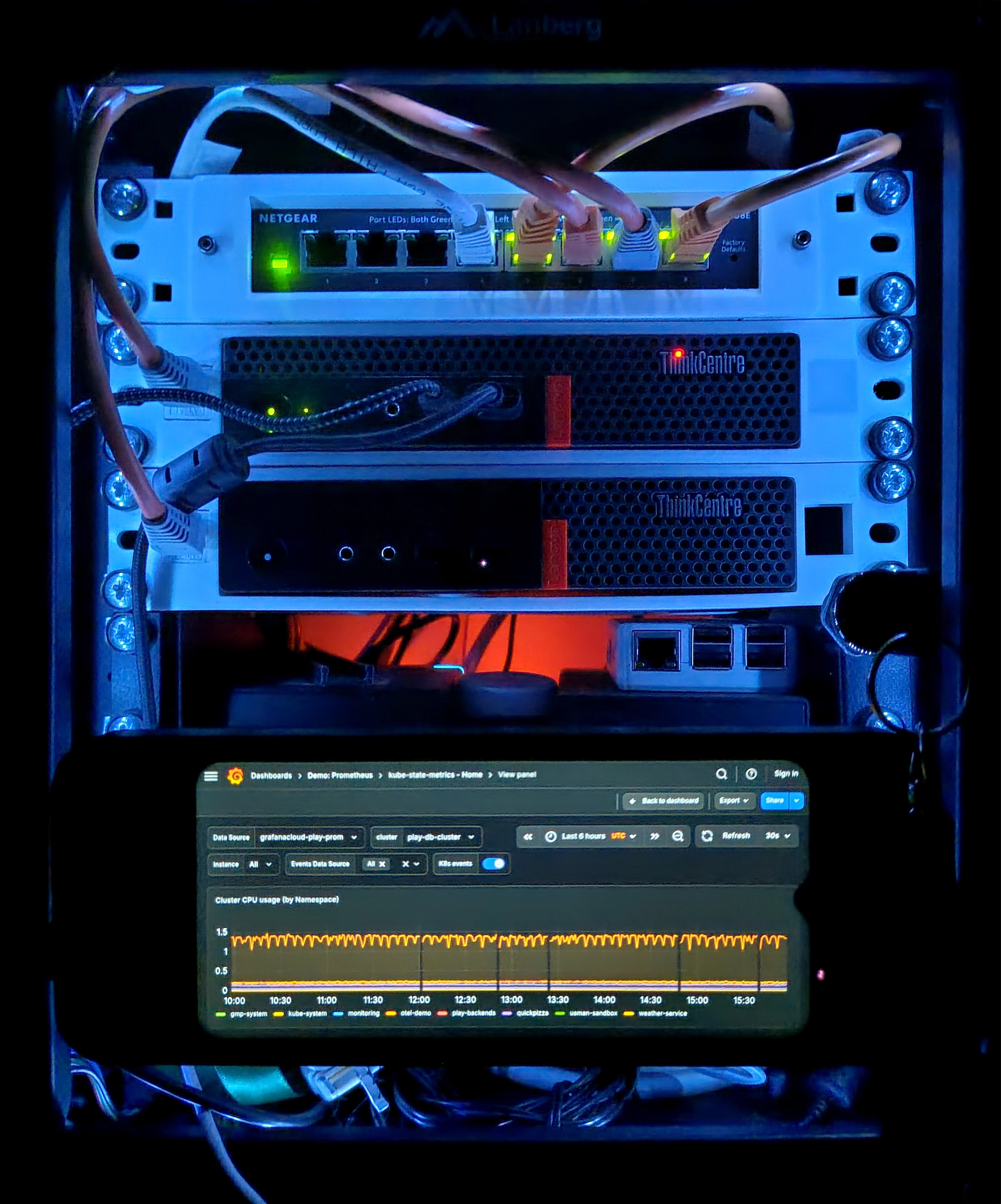
This is a living document.
- Serves as a reference for my homelab.
- Helps me grow my technical documentation skills.
Hosts
Physical
pve-01.home.majabojarska.dev— Lenovo Tiny M920q- Role: Main hypervisor
- CPU: i5-8500T (6 x 2.1GHz)
- RAM: 32GB DDR4 SODIMM, hoping to expand to 64GB once prices fall a bit (one can hope).
- Storage:
- OS, disk images: 2TB M.2 NVMe
- PCIe passthrough to virtual guests: 3 x 1TB 2.5“ SATA SSD
pve-02.home.majabojarska.dev— Dell Optiplex 7020- Role: Experimental hypervisor, spinner array host
- CPU: i5-4590 (4 x 3.3GHz)
- RAM: 24GB DDR3 DIMM
- Storage:
- OS, disk images: 120GB 2.5“ SATA SSD
- General purpose storage, VM passthrough:
- 2 x 2TB 3.5“ SATA HDD
- 1 x 640GB 3.5“ SATA HDD
pve-03.home.majabojarska.dev— Lenovo Tiny M720q- Role: Secondary hypervisor, backup in case of
pve-01failure. - CPU: i3-6100T (3 x 3.2GHz)
- RAM: 8GB DDR4 SODIMM
- Storage:
- OS, disk images: 240GB 2.5“ SATA SSD
- Role: Secondary hypervisor, backup in case of
Virtual
opnsense.home.majabojarska.dev- Role: homelab router
- Hypervisor:
pve-01.home.majabojarska.dev
kube-01.home.majabojarska.dev- Role: Single-node Kubernetes (K3s) cluster, bulk of self-hosted services.
- Hypervisor:
pve-01.home.majabojarska.dev
hass.home.majabojarska.dev- Role: Home Assistant OS
- Hypervisor:
pve-01.home.majabojarska.dev
nas.home.majabojarska.dev- Role: NAS
- Hypervisor:
pve-02.home.majabojarska.dev
majabojarska.dev- Role: general purpose VPS
- Hypervisor: Linode Cloud
Networking
Devices
Netgear GS308E
- Handles port-based, VLAN-aware switching (802.1Q).
- Facilitates running a router over a single ethernet interface in a secure fashion, via tagged VLANs.
Archer C6 v2
- Dumb, VLAN-aware AP with multiple software-defined APs
- 2.4GHz, 5GHz
- Uplinked to the router a single trunk with tagged VLANs.
OPNsense, virtualized on
pve-01.home.majabojarska.dev.
VLANs
| ID | Role |
|---|---|
| 0 (untagged) | Homelab |
| 10 | IoT network |
| 20 | Guest network |
Addressing
| Network | IPv4 range (CIDR) | Gateway | Has DHCP? |
|---|---|---|---|
| Homelab | 192.168.1.0/24 | 192.168.1.1 | Yes |
| IoT | 192.168.10.0/24 | 192.168.10.1 | Yes |
| Guest | 192.168.20.0/24 | 192.168.20.1 | Yes |
DNS
majabojarska.devis the root domain for all my infrastructure needs.home.majabojarska.devalways points to192.168.1.1(intranet), which serves as the recursive resolver for any matching subdomains (wildcard).- Tailscale is set up to use
192.168.1.1as the resolver (one of). Meaning, remote VPN session resolve homelab domains just fine. 192.168.1.1resolves outside domains via DoH, with multiple upstream resolvers configured for redundancy.home.majabojarska.devenforces DNS blocklist policies for ads, spam, and digital trash that I do not wish to resolve successfully.
VPN
The OPNsense router handles all VPN routing, so that client devices can run light at home.
- A Tailscale client is configured as a subnet router for the Tailnet.
- A WireGuard client provides peering to
hswro.orginfra.
NTP
home.majabojarska.dev runs the Chrony NTP server at the standard port 123.
Storage
🚧
This section will describe the different storage pools/devices on different hosts, and their purposes.
Backups
- Personal dev machines
- Method: Vorta (Borg Backup) to a dedicated ZFS location on
nas.home.majabojarska.dev. - Schedule: weekly
- Trigger: manual, mostly due to
nas.home.majabojarska.devbeing powered off most of the time to limit energy consumption.
- Method: Vorta (Borg Backup) to a dedicated ZFS location on
- Kubernetes PVs, ETCD snapshots:
- Method: Borgmatic
- Schedule: nightly
- Trigger: midnight cron
- Notes:
- As a pre-backup script, Borgmatic triggers an ETCD snapshot (to filesystem), and then cordons, drains, and stops the K3s systemd unit.
- Backing up PVs and ETCD snapshots together ensures that upon disaster recovery, the “state of the world” is congruent between the cluster’s state, and the applications’ state.
- OPNsense configuration is version tracked in a self-hosted Git instance.
- Method: Git plugin
- Schedule: N/A
- Trigger: any configuration change
Secret management
Ansible
Ansible secrets are encrypted via [ansible-vault](ansible-vault decrypt group_vars/all/secrets.yaml).
# Decrypt
# Encrypt
The encryption key is not tracked by VCS, but it’s kept in the homelab’s password manager.
When cloning the repo on a new machine, place the key at <repo_root>/.vault_pass (defined via ansible.cfg).
NixOS hosts
- Secrets for NixOS hosts are encrypted at rest via agenix.
- Effectively, the encryption is based on SSH key pairs.
- During deployment, they’re shipped encrypted, and decrypted on the target host, with its own private key.
- The target system is enrolled in the encryption scheme via its own, autogenerated SSH key (in
/etc/ssh).
- The target system is enrolled in the encryption scheme via its own, autogenerated SSH key (in
- For each host: both the developer’s (mine), and the target host’s public keys are enrolled in the encryption scheme. In consequence, any of the corresponding private keys can be used to decrypt the secret, in order to update its contents.
The implementation is based on the NixOS Agenix documentation.
To edit an age secret or create a new one:
# From dir containing 'secrets.nix'
# Alternatively, specify the path to the 'secrets.nix' file via the RULES env var.
Kubernetes
- Kubernetes
Secretobjects are provisioned by the External Secrets Operator. ExternalSecretsdefine theSecretsto be provisioned (and managed).- Think of them as
Secretrecipes. - They only contain entry IDs and field names, referencing the backing secret store.
- Think of them as
- Bitwarden is the secret store of choice, and it’s defined via a ClusterSecretStore resource (cluster-wide).
- No plain-text secrets are stored in the
infraGit repository, nor should they ever be. - Bitwarden connectivity is provided by a Bitwarden CLI instance, running in-cluster, in HTTP server mode.
- Docker image provided by majabojarska/bitwarden-cli-docker.
- Deployed using the ESO Bitwarden Helm chart. Eventually to be replaced with majabojarska/bitwarden-cli-helm, once that’s ready. Also hoping to add this Helm chart as a recommendation to ESO docs, once the project matures (both implementation, and maintenance wise).
- Network connectivity between ESO components and the Bitwarden server is governed by a
NetworkPolicy, and enforced by the Flannel CNI. - Whenever new secrets are added, ESO might need a couple minutes to complete the secret reconciliation. Use longer timeouts to account for this when deploying new components requiring
Secrets.- Planning to improve this with Flux post-deployment jobs.
SOPS
As of 2025-12-20, secrets are being migrated over to SOPS backed by age, deployed via FluxCD.
Most notably:
- The SOPS age private key is deployed at
flux-system/sops-keys. It is also backed up via the lab’s Bitwarden vault. - The cluster’s FluxCD config directory contains a
.sops.yamlfile, defining the file names and YAML keys allowlisted for encryption. It also contains the age public key – this key must match the deployed private key (they constitute a key pair). - The encryption scheme is based on the following resources:
Handy ~/.zshrc snippet to aid with secret handling:
Future plans & ongoing work
Services
- Deploy AudioMuse-AI and integrate it with Jellyfin
- Setup Authentik and SSO auth in services.
- Setup Renovate for my infra, mainly for Helm chart autoupdate PRs.
- This is already done, need to document the solution.
- O11y and alerting: Grafana, Prometheus, ntfy.
- Just need to reinstate this and hook up ntfy.
- Deploy copyparty, remove Nextcloud.
Networking
- Migrate to Cilium.
- Control traffic flow with Network Policies.
Hardware
Disk bays
Planning to migrate my 2.5“/3.5“ disks to a PCIe SATA controller. I’ll use the following designs for rack-mounting the disks: